
Engagement Links
Display organized link groups with categories, descriptions, and clickable items for navigation or resources.
The Engagement Links notification displays structured groups of links organized by categories. Each category has a title, description, and a list of clickable links — making it ideal for resource hubs, navigation menus, or curated content collections within a popup.
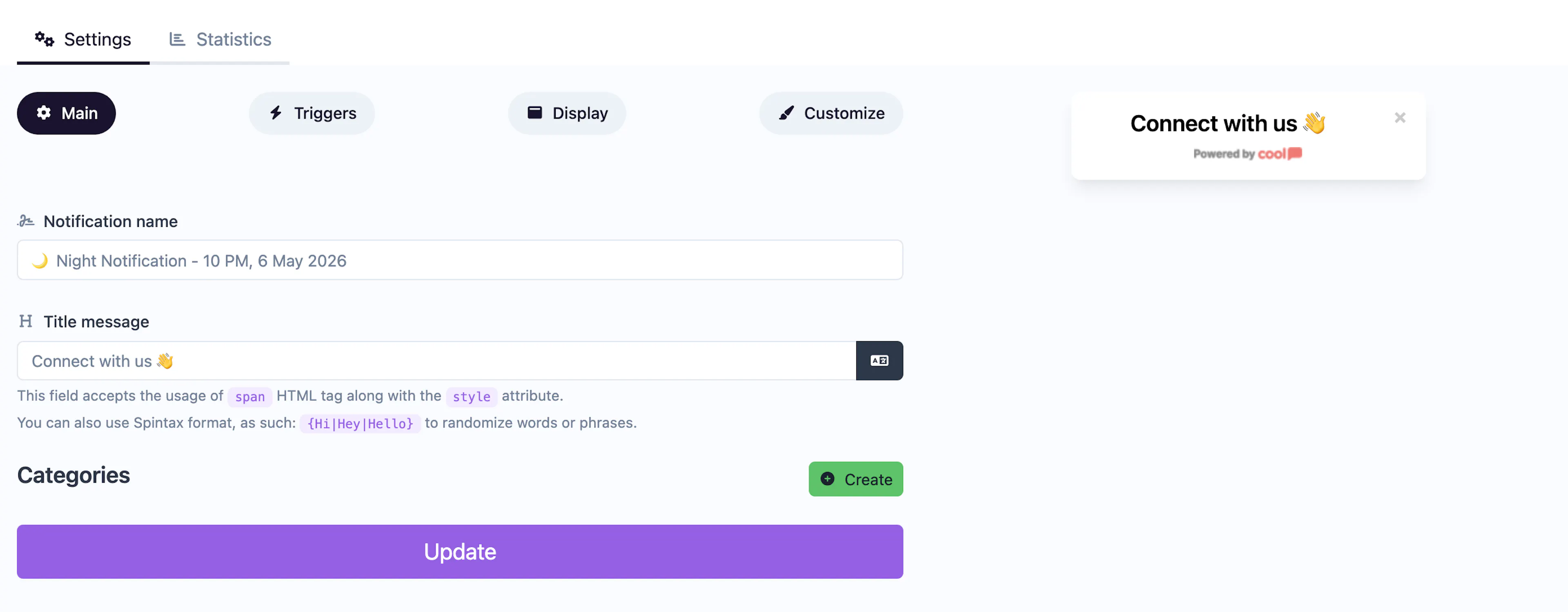
Main tab fields
| Field | Description |
|---|---|
| Notification name | Internal label for your reference. Not shown to visitors. |
| Title message | The main headline displayed above the link categories. Supports <span> HTML and Spintax. |
| Categories | Structured link groups. Each category includes: |
| • Category title — Heading for the group. | |
| • Category description — Optional text describing the group. | |
| • Links — An array of clickable items, each with its own title and description. |
Customize colors
| Color | Description |
|---|---|
| Title color | Text color of the main headline. |
| Categories title color | Text color of category headings. |
| Categories description color | Text color of category descriptions. |
| Categories links title color | Text color of individual link titles. |
| Categories links description color | Text color of individual link descriptions. |
| Categories links background color | Background of individual link items. |
| Categories links border color | Border around individual link items. |
| Background color | Background of the popup container. |
For shared settings like triggers, display position, animations, and borders, see the Common Editor Settings reference.
Use cases
- Resource hubs — Organize help articles, guides, and docs in a popup.
- Navigation menus — Offer quick access to key pages from any page on your site.
- Content collections — Curate blog posts, case studies, or tools by topic.
- Onboarding links — Guide new users to important getting-started resources.
For a simple notification with a single link, use the Informational type instead.
Was this page helpful?