
WhatsApp Chat
Display a WhatsApp chat widget with an agent profile, pre-filled message, and click-to-chat button.
The WhatsApp Chat notification displays a chat-style widget with an agent avatar, name, description, and a pre-filled message. Visitors click the button to open a WhatsApp conversation with the specified phone number — no code integration required.
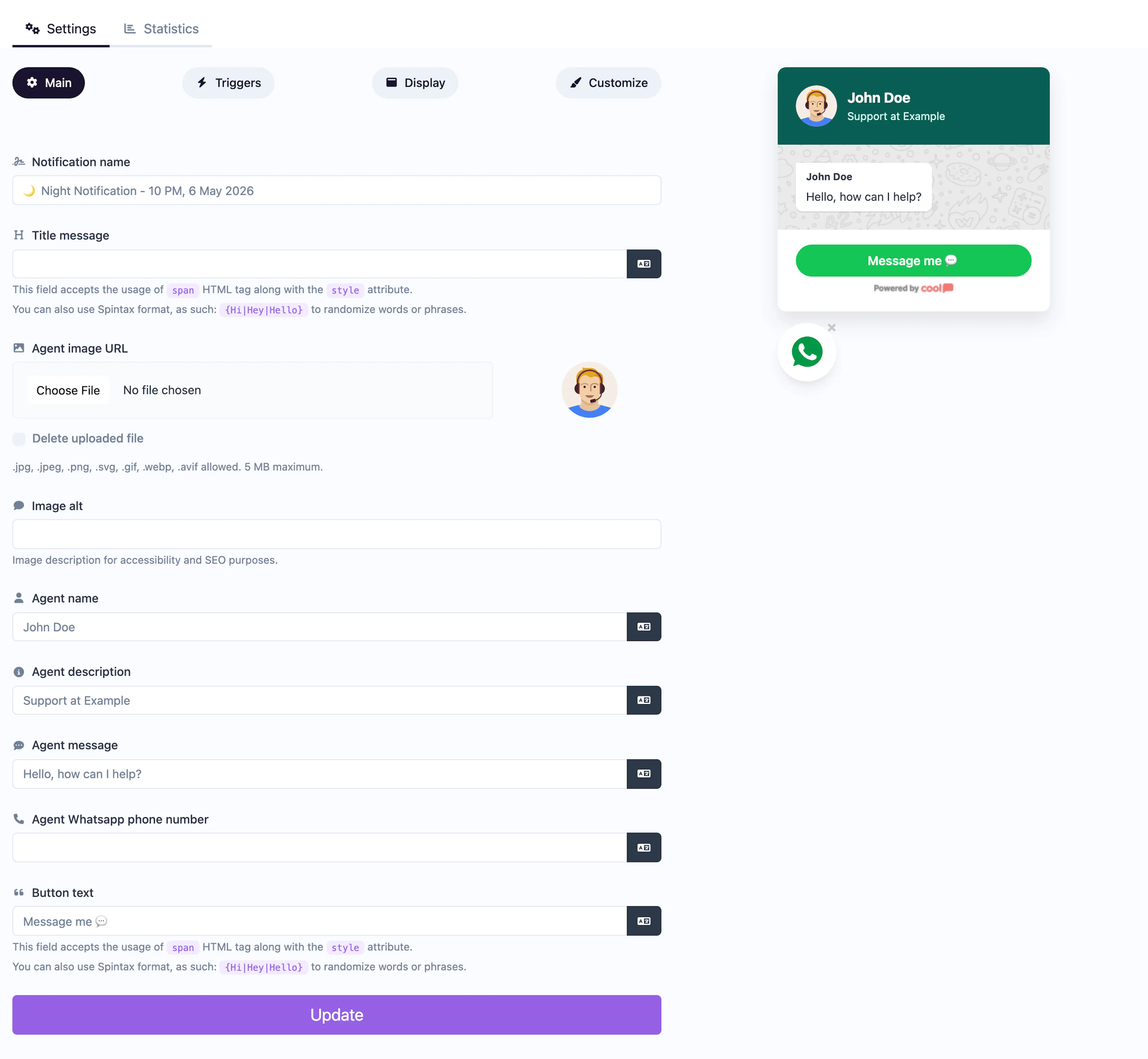
Main tab fields
| Field | Description |
|---|---|
| Notification name | Internal label for your reference. Not shown to visitors. |
| Title message | The header text displayed at the top of the chat widget. Supports <span> HTML and Spintax. |
| Agent image | Avatar photo for the chat agent. |
| Agent image alt | Accessibility text for the agent image. |
| Agent name | Name displayed for the agent (e.g., "Sales Team", "Sarah"). |
| Agent description | Short descriptor below the agent name (e.g., "Usually replies within minutes"). |
| Agent message | The pre-filled chat bubble message shown in the widget (e.g., "Hi! How can I help you today?"). |
| Agent phone number | The WhatsApp phone number visitors will message (include country code, e.g., +1234567890). |
| Button text | Label for the send button (e.g., "Start Chat", "Message Us"). |
Customize colors
| Color | Description |
|---|---|
| Header agent name color | Text color of the agent name in the header. |
| Header agent description color | Text color of the agent description in the header. |
| Header background color | Background of the chat header area. |
| Content background color | Background of the chat message area. |
| Content agent name color | Text color of the agent name in the message area. |
| Content agent message color | Text color of the chat bubble message. |
| Content agent message background color | Background of the chat bubble. |
| Footer background color | Background of the footer/button area. |
| Footer button background color | Background of the send button. |
| Footer button text color | Text color on the send button. |
For shared settings like triggers, display position, animations, and borders, see the Common Editor Settings reference.
Use cases
- Sales support — Let potential customers reach your sales team instantly.
- Customer service — Provide a quick WhatsApp contact point on product pages.
- Order inquiries — Allow shoppers to ask about products or order status.
- Appointment booking — Let clients message to schedule via WhatsApp.
For a multi-channel contact option, use the Contact Us type which supports WhatsApp alongside email, phone, and other channels.
Was this page helpful?